Find, protect and move every file across your cloud storage.
One controlled workspace to search millions of objects, automate backups and migrations, and find the storage you are paying for and not using — across Amazon S3, Cloudflare R2, Google Cloud Storage, Azure Blob and your own servers.
No credit card. Connect your first AWS account in minutes.
Or try it on a sample estate first. No sign-up.
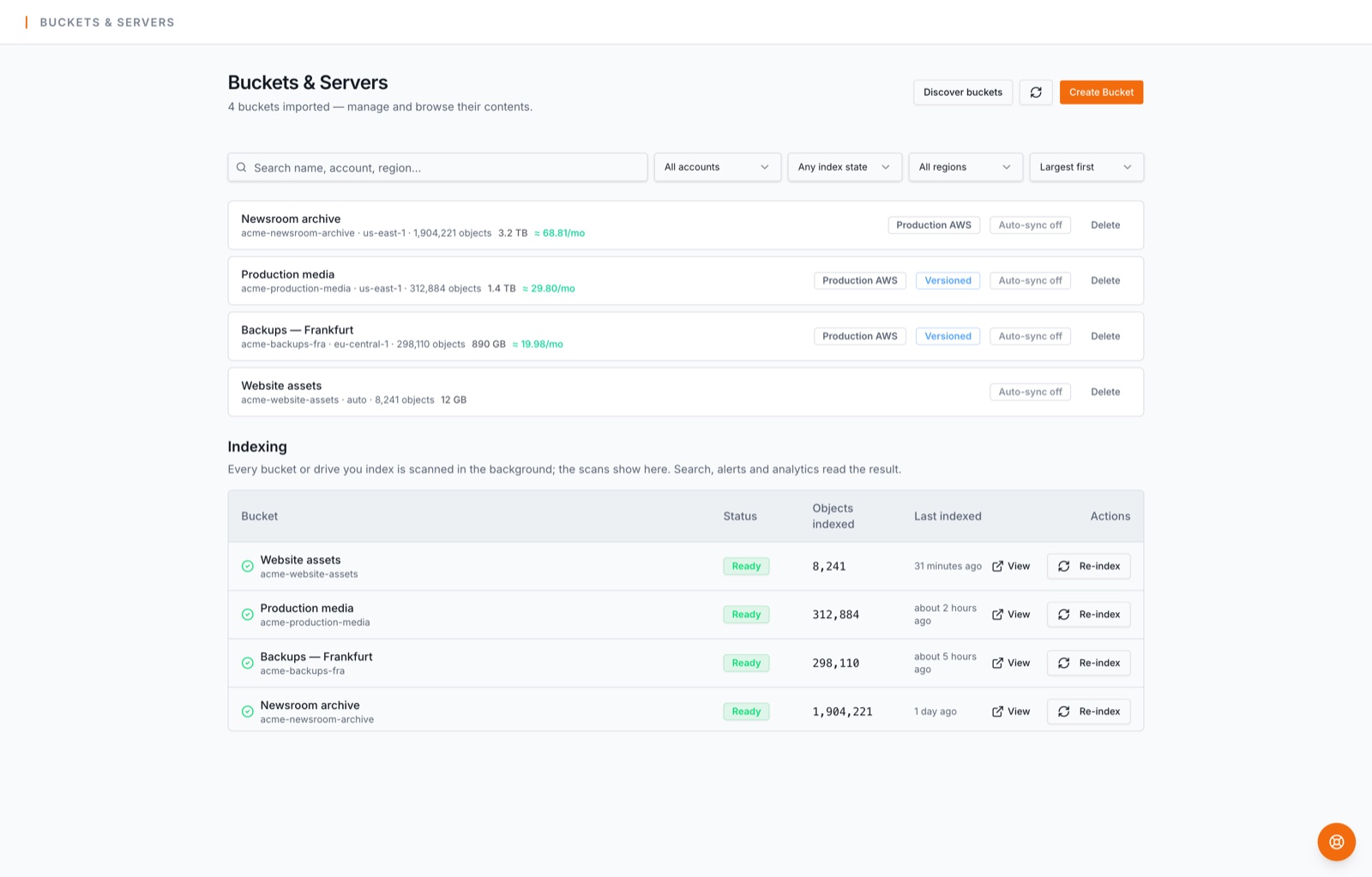
Measured from the product, as of October 2026.
Four things your storage team stops worrying about
From a single upload to hundreds of millions of files, across every bucket and server you own.
Find anything
Every bucket and server indexed, so a file name is an answer, not a search party.
- Search up to 50M objects per account with wildcards, filters by type, size and storage class
- Duplicates matched on content, not name, with a link that finds every copy
- Amazon S3, Cloudflare R2, Google Cloud Storage and any Linux or Windows server over SSH, side by side
Protect everything
Backups that run without you, and a way back when someone deletes the wrong thing.
- Incremental backups, bucket to bucket or server to bucket, hourly to monthly
- Every version of a file kept; a delete or an overwrite is one click from undone
- Backup health for every bucket, and an email the moment a run needs attention
Move data safely
Migrations that finish, with a log for every file and nothing to babysit.
- Servers, Azure Blob and other buckets into S3, R2, GCS or BucketPilot Cloud
- Runs retry on their own, recover from a dead worker, and a re-sync takes seconds
- A desktop drive connected directly to your bucket: install BucketPilot Drop on Mac or Windows, drag files in, uploads are verified automatically, no cloud keys shared
Control cost and access
See what you pay for, stop paying for what you don't need, and know who did what.
- Size and cost per bucket by storage class, alerts in GB or TB, lifecycle rules and policies checked before your provider sees them
- Roles enforced by the API: admins, members who never touch credentials or deletes, read-only viewers
- An audit trail of every action, including blocked attempts, exportable to CSV
How it works
Three steps, the first of which takes about a minute.
- 1
Connect your storage
Use a least-privilege AWS role, or connect Cloudflare R2, Google Cloud Storage, a server over SSH, or create a BucketPilot Cloud bucket. Credentials are encrypted at rest.
- 2
Choose what BucketPilot should do
Search, back up, migrate, mirror, watch a folder, set an alert, or run the Savings Finder. Each one is a form, not a script.
- 3
BucketPilot runs and monitors it
Follow progress live, get notified once per batch, read the per-file log, and restore a version when you need one.
Savings Finder
Find the money hiding in your buckets
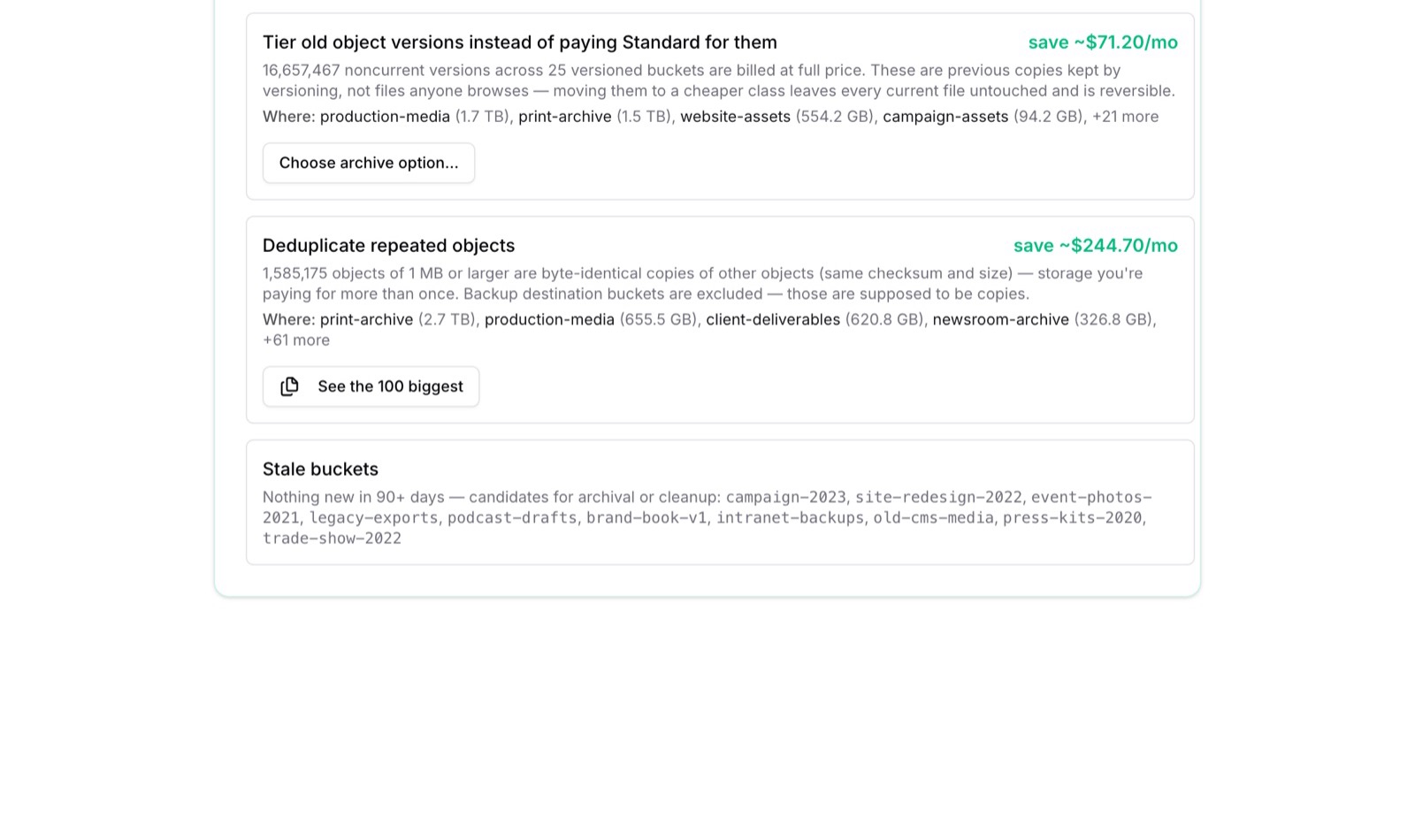
Connect a bucket, index it, and BucketPilot names what you are overpaying for — with the dollar figure and the fix on each line. Nothing is changed until you press the button.
- Cold data on the wrong class. Objects untouched for 90 days, priced against every colder class, moved by a lifecycle rule you choose.
- Old versions billed at full price. The previous copies versioning keeps, counted and priced, tiered without touching a current file.
- Files stored twice — or six thousand times. Matched on content, not on name, with a link that finds every copy.
- Buckets nobody has touched. Named, so the campaign that ended two years ago stops costing money.
What teams use it for
Pick the one that brought you here.
Automated cloud backups
Bucket to bucket or server to bucket, hourly to monthly, every version kept.
Read howServer and cloud migrations
Linux, Windows, SFTP and Azure Blob into S3, R2, GCS or BucketPilot Cloud, resumable and logged.
Read howSearch across millions of objects
Indexed once, searched in seconds: wildcards, size, type, storage class, duplicates.
Read howStorage cost optimization
Cold data, old versions and duplicates named with the monthly saving for each.
Read howAll 24 use cases, or the step-by-step for your exact pair of source and destination: 37 guides.
Security and data architecture
Built to be trusted with the important copy
What we can see, what we keep, and how you would know if anything changed.
Least privilege, by default
Connect AWS with a role scoped to the buckets you choose, not root keys. Credentials for every provider are encrypted at rest and never shown again after you save them. BucketPilot Drop signs in as a person, so no key ever lands on a laptop.
Your data stays yours
When you connect your own storage, your object data isn't persistently stored by BucketPilot — we keep metadata only. Browser transfers go direct over presigned URLs, and the migrations and backups you configure stream data between source and destination without keeping it. Files you deliberately put in BucketPilot Cloud are the exception: they are stored in the region you chose and nowhere else, until you delete them.
BucketPilot Cloud, plainly
Object storage we run in six regions across the US, Europe and Asia Pacific. Versioning keeps every copy of a file; there are no download, request or transfer fees; storage is billed per GiB-month for a minimum of 90 days; a deleted bucket stays restorable until its term ends. Regions are not replicated to each other — a second copy is a backup job you schedule.
Roles the API enforces
Admins manage everything; members work without touching credentials or deletes; read-only viewers can look but never change. Per-bucket and per-folder grants, allow and deny, checked on every request — not hidden buttons.
An audit trail you can hand over
Every upload, job, permission change, device connection and blocked attempt, attributed to who did it, with one-click CSV export for compliance reviews.
Nothing silent
Live progress, per-object run logs, in-app and email notifications, and a full activity trail for every job and upload. Transient errors retry with backoff; a worker that dies mid-run is detected and the run recovered.
The full statement, in questionnaire terms: Security & data handling.
Business plan
One workspace for your whole team
Buckets, jobs, and history shared across your organization — with the guardrails that let you invite people without holding your breath.
Roles that mean something
Admins manage everything; members work without touching credentials or deletes; read-only viewers can look but never break. Enforced server-side, not just hidden buttons.
See the whole team's picture
Per-member activity and storage contribution, a savings finder with real dollar amounts, backup health for every bucket, and a Monday digest that keeps everyone honest.
An audit trail you can hand over
Every action attributed to who did it — including blocked attempts — with one-click CSV export for compliance reviews.
How a team works in BucketPilot
- 1.Create your organization and invite teammates by email, right from the Team page — they get a branded invite and join in one click.
- 2.Your buckets, credentials, jobs, and history become the team's shared workspace. Everything shows who did it.
- 3.Assign roles: admins manage everything, members work without deletes or credential access, viewers see everything and touch nothing — enforced by the API, not hidden buttons.
- 4.Attempted actions beyond someone's role land in the shared activity feed, so permission gaps surface before they become tickets.
- 5.Every Monday the owner gets a digest — storage, spend, savings, backup coverage, team activity. Members can opt in too.
Simple pricing that scales with you
Every account starts with a 14-day Pro trial. No credit card required.
Starter
$190 billed once a year — 2 months free
Full control of your buckets
- Amazon S3 bucket management
- File upload & download, folder & bulk zip downloads
- AWS access keys or one-click CloudFormation setup
- 1M indexed objects
- Auto-sync — keep a bucket's index current, hourly or daily
- Index now — re-index any bucket on demand, 1 at a time (the rest queue)
- Storage & cost analytics
- Self-serve help center
Pro
$790 billed once a year — 2 months free
Automate backups and migrations
- Everything in Starter
- Backup, replication & migration jobs (4 parallel copy threads)
- Migrate from your own servers into a bucket
- Restore any job back to where it came from — bucket or server
- Cross-region & cross-account replication
- SSH host-key verification (trust-on-first-use)
- Scheduled backups — hourly, daily, or weekly
- Bucket policy editor with drift detection & one-click restore
- Lifecycle rules & cold-data tiering
- AI support assistant, grounded in your account
- Public REST API — 60 requests/min per key
- Upload & backup complete notifications
- 10M indexed objects
- Index now runs 2 buckets at a time
- Advanced analytics — growth trends, activity timeline, file-type insights
Business
$1,990 billed once a year — 2 months free
Your whole team, one workspace
- Everything in Pro
- Multi-cloud — Cloudflare R2 & Google Cloud Storage buckets
- Azure Blob Storage migrations
- Copy to your own servers — server → server and bucket → server
- Bucket policy editor with drift detection & one-click restore
- Lifecycle rules & cold-data auto-tiering
- AI support assistant & SSH host-key verification
- Team workspace — invite your whole team, no seat limit
- Shared buckets, jobs, and activity across your organization
- Roles & permissions (admin, member, read-only)
- Faster jobs — 8 parallel copy threads
- Public REST API — 300 requests/min per key
- Team analytics — per-member activity & storage contribution
- Savings finder — cost-cutting recommendations from your real data
- Backup health board — coverage, freshness, success rate
- Bucket size & cost alerts — email thresholds, as many as you need
- Weekly email digest — storage, spend, savings, team activity
- Audit log CSV export
- 50M indexed objects
- Index now runs 4 buckets at a time
Enterprise
Your scale, your terms
- Everything in Business
- Custom index limits
- Dedicated support and SLA
- Talk to BucketPilot Sales Team
Permanent read-only access — $0. When a trial or a plan ends, nothing is deleted and nothing expires: browse and download everything you connected, read your whole job history, for as long as you like. Indexing, jobs and changes pause until you subscribe again; your cloud data is never touched.
Start free trial →Prices in USD. There is no cap on how much data you connect — your files stay with your provider, which bills you for storage as usual. BucketPilot Cloud storage is billed separately at $0.015 per GiB-month (about $15 per TiB), with no download, request or transfer fees, as its own monthly invoice on the 1st. Outgrowing your plan's indexed-object limit? Upgrade any time, or talk to us about Enterprise. Cancel any time — your account keeps read-only access for as long as you want it, and your cloud data is never touched.
Frequently asked questions
Do I need a credit card to try it?
No. Signing up starts a 14-day trial with full Pro access — schedules, backup jobs, migrations, everything. You only enter a card when you subscribe.
Does BucketPilot store my files?
Not when you connect your own storage — your object data is not persistently stored by BucketPilot. We keep metadata (keys, sizes, storage classes) to power search, and browser transfers go directly to your storage over presigned URLs. During a migration or backup you configure, BucketPilot may temporarily stream data between source and destination without persisting the object contents. The one exception is BucketPilot Cloud: files you deliberately put in a Cloud bucket are stored by us, in the region you selected and nowhere else, until you delete them.
Am I paying BucketPilot for storage?
Only for BucketPilot Cloud. Storage you connect — Amazon S3, Cloudflare R2, Google Cloud Storage, your servers — is billed by its provider exactly as before, and there is no cap on how much of it you connect — plans are limited by indexed objects only. A BucketPilot Cloud bucket is the exception: its storage is billed separately, per GiB-month, on your BucketPilot invoice, with no download, request or transfer fees.
What happens when my trial or subscription ends?
Your account keeps permanent read-only access, at $0, with no countdown and no expiry date: browse and download everything you connected, read your job history, and nothing is deleted. What stops is the acting — no jobs, no re-indexing, no changes — until you subscribe again. Your own cloud storage is never touched either way. Re-subscribe any time and everything picks up where it left off.
Can I manage billing myself?
Yes — plan changes, card updates, invoices, and cancellation are all self-serve inside the app. Stripe handles the money; you never leave BucketPilot.
Book a demo
See it on your own buckets.
Thirty minutes, no slides. Bring a backup or a migration you have been putting off and we do it together, live.
- Your buckets and servers, not a demo account
- A calendar invite the same working day
- Times are GMT+3, Sunday to Thursday
Pick a day
…and a time
Put your buckets on autopilot today
Full Pro access for 14 days. No credit card. Connect your first account in minutes.