Why CORS fails in a way that tells you nothing
CORS decides which websites may read from or write to a bucket directly from a visitor's browser. When a request is not allowed, the browser throws the response away before your code sees it. The bucket's log shows a normal request, your JavaScript gets a bare "Failed to fetch" or a console line about a missing header, and neither names the rule or the field that was wrong.
Fixing it by hand means editing a JSON or XML document, saving it, and then loading your own site to find out. And S3's answer to a malformed rule is MalformedXML, which names neither the rule nor the field.
What BucketPilot does
On a bucket's Security tab:
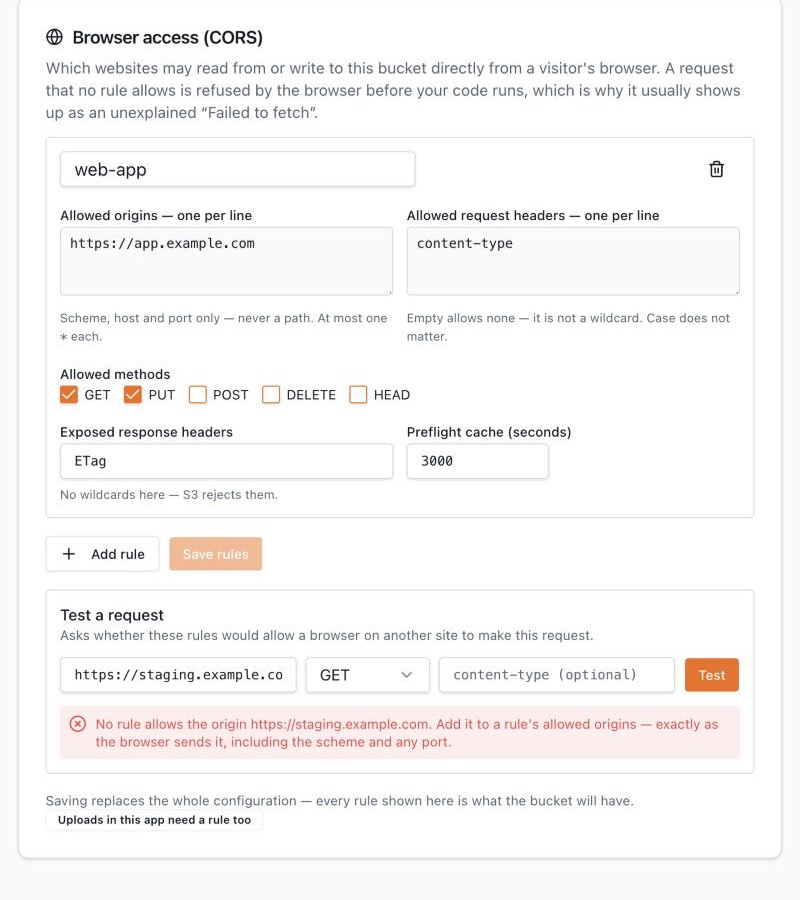
- •A form instead of a document. Allowed origins one per line, methods as checkboxes, request headers, exposed headers and how long a browser may cache the answer.
- •Rules are checked before they are saved. A path in an origin, a second wildcard, an unsupported method or a wildcard in the exposed headers is refused with the reason, not with
MalformedXML. - •A test for the question a browser cannot answer. Give an origin, a method and any request headers, and BucketPilot says whether the bucket's live rules would allow it — and if not, whether it was the origin, the method or a header, and what to change. A browser only ever sends the origin it is on, so a test run from BucketPilot could only tell you whether BucketPilot may reach the bucket, never your site.
- •Unsaved edits are not tested. The test reads what is saved, and says so while you have changes pending.
How to set it up and test it
- 1.Open the bucket and go to Security → CORS.
- 2.Add a rule. Under Allowed origins put the exact site, for example
https://app.example.com. Tick the methods the page uses:GETto read,PUTorPOSTto upload,HEADto check an object. - 3.Under Allowed request headers list what your code sends (
content-type, for a JSON or typed upload). An empty list allows none; it is not a wildcard. - 4.To let your script read a response header, add it under Exposed response headers. Multipart uploads need
ETagexposed, because a browser hides it otherwise. - 5.Save rules. Then, in Test a request, enter the origin, pick the method, add the headers, and press Test.
- 6.Try the case that should be refused too — another site's origin, or a method you did not allow — and read the reason it gives.
To check from outside BucketPilot, send the preflight a browser would send. This needs no credentials:
curl -i -X OPTIONS "https://YOUR-BUCKET.s3.YOUR-REGION.amazonaws.com/test.txt" -H "Origin: https://app.example.com" -H "Access-Control-Request-Method: PUT" -H "Access-Control-Request-Headers: content-type"An allowed request answers with Access-Control-Allow-Origin and Access-Control-Allow-Methods; a refused one answers 403. The final proof is your own page in a browser with the developer tools open, on the Network tab.
Details that decide whether it works
- •Saving replaces the whole configuration. S3 has no per-rule write, so every rule on the form is exactly what the bucket will have afterwards.
- •An origin is scheme, host and port — never a path. A browser never sends one, so
https://app.example.com/orhttps://app.example.com/adminmatches nothing. Each origin may contain at most one*, for examplehttps://*.example.com. - •Methods are
GET,PUT,POST,DELETEandHEAD. S3 has noPATCH. - •BucketPilot needs a rule of its own. Uploads and downloads in the file browser go straight from your browser to your storage. If you remove every rule, BucketPilot adds its upload rule back on the next transfer instead of leaving the app broken. A bucket that should be closed to browsers has to be closed in your provider's console.
- •The rule BucketPilot adds is not
*. It allows only BucketPilot's own origin,https://bucketpilot.io. Buckets created before 2026-10-29 had an any-origin rule instead; BucketPilot replaced exactly that rule and left any rule you had edited alone. To call a bucket from your own site, add your origin as a second origin in the same rule and keep BucketPilot's, or the file browser's uploads stop working. The editor warns you, in red, when the rules on screen would not allow BucketPilot, and the save button reads Save anyway. - •
*as an origin lets any website use the rule. It is sometimes right for a public asset bucket and rarely right for anything else. On the Business plan the Security section of Analytics lists every bucket with a rule that allows any origin, and opens the bucket on this tab. - •Who can change it. Members cannot change CORS on a workspace bucket; admins can.
- •Which providers. Amazon S3, Cloudflare R2 and BucketPilot Cloud buckets can be edited from BucketPilot. Google Cloud Storage and Azure Blob do not expose it over the interface BucketPilot uses, so it is set in their own console.
When this is the right tool
- •A web app uploads to a bucket with presigned URLs and the browser says "Failed to fetch".
- •A front end loads fonts, images or JSON straight from a bucket and the console shows a missing
Access-Control-Allow-Origin. - •You are about to widen or narrow the allowed sites and want to know the result before you save it.
When it is not. CORS only governs a browser. A server, curl or a script is never stopped by it, so a request that works from your backend and fails from a page is exactly this problem, and a request that fails from your backend is not. Who may read an object at all is the bucket policy, not CORS.
Questions
- Why does my upload work from the server but fail in the browser?
- Because only a browser enforces CORS. The server request never asks the bucket whether a site may do it. In the browser, the bucket has to answer a preflight for your origin, method and headers, and the response is discarded when it does not.
- Does the test run a real request against my bucket?
- No. It evaluates the bucket's saved rules against the origin, method and headers you give, and tells you which of the three would fail. It never uploads or reads an object.
- Why does the test ignore the rules I have just typed?
- It tests what is saved on the bucket, since that is what a browser will meet. The page says so while you have unsaved changes. Save, then test.
- Can I use a wildcard for the allowed request headers?
- Yes for the allowed request headers. An empty list allows none, which is the usual mistake. Exposed response headers cannot contain a wildcard; S3 rejects the whole configuration if one does.
- Why was my rule rejected before saving?
- BucketPilot checks the rule first, because S3's own answer is MalformedXML with no rule or field named. The common causes are a path or trailing slash on an origin, more than one * in an origin, and an unsupported method such as PATCH.
- I removed all the rules and uploads still work. Why?
- BucketPilot re-adds its own upload rule on the next transfer, so its file browser keeps working. To close a bucket to browsers entirely, do it in your provider's console.
Go deeper
Test my bucket's CORS
Full Business access for 14 days. No card. Connect an account in seconds.